What has to be on an FNSKU label
Amazon's fulfilment centres scan millions of units a day, and the label format is fixed so that every one reads the same way. A compliant label has four things:
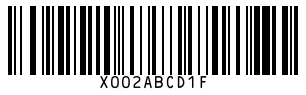
- The barcode, in Code 128, encoding the 10-character FNSKU.
- The FNSKU in text directly under the bars, so a person can key it in if the scan fails.
- The product title, shortened if needed. Amazon trims long titles in the middle, keeping the start and the end, and this tool does the same.
- The condition, such as New.
How to print FNSKU labels with this tool
- Copy the FNSKU from Manage FBA Inventory in Seller Central. It is 10 characters and usually starts
X00. - Paste the product title and choose the condition.
- Pick your label stock: 30 per sheet for an office printer, or a thermal roll size.
- Enter how many labels you need and press Print.
- In the print dialog set scale to 100%, margins to None, and turn off headers and footers.
Label requirements, in plain terms
| Requirement | What Amazon expects |
|---|---|
| Label size | Between 1 x 2 in and 2 x 3 in |
| Black on white, non-reflective, no smudging | |
| Printer | Thermal or laser. Inkjet is discouraged because it smears. |
| Clear space | About 0.25 in at the sides of the barcode and 0.125 in above and below |
| Adhesive | Removable is recommended, so the buyer can peel it off |
| Placement | On a flat surface, not over a seam, corner or curve |
| Other barcodes | Covered, so only the FNSKU can be scanned |
Mistakes that get inventory lost or charged
- Leaving the UPC visible. A receiver who scans the manufacturer barcode may book your unit against another seller's stock.
- Using one FNSKU for every variant. Each size and colour has its own FNSKU. Print and apply them separately.
- Labelling the shipping carton and not the units. Every sellable unit needs its own label. The carton gets a different shipment label from Amazon.
- Printing with Fit to page. It shrinks the sheet a few percent and the bottom rows slide off the labels.
- Sets and bundles. The FNSKU goes on the outside of the bundle, with the units inside sealed and marked as a set.
FNSKU or manufacturer barcode?
When you create an FBA listing you choose between an Amazon barcode (the FNSKU) and the manufacturer barcode (the UPC already on the pack). The manufacturer option saves labelling, but identical units from different sellers can be pooled together, so a buyer of your offer may receive another seller's stock. Most private-label sellers choose the Amazon barcode to keep their units separate. The guide on FNSKU vs UPC explains the trade-off in full.
You still need a UPC to create the listing in the first place. If you have licensed numbers and need the image for your packaging, use the UPC generator. For your own stockroom labels outside Amazon, the Code 128 generator and bulk barcode generator cover it.