How to make a UPC barcode
- Enter your number. Type the first 11 digits and the 12th is calculated for you. If you already have all 12, type them all and the last digit is verified.
- Check the message under the box. Green means the number is consistent. Red tells you which digit is wrong and what it should be.
- Download. Choose SVG for packaging artwork and print shops, or PNG for label software, documents and spreadsheets.
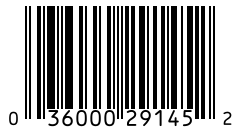
What the 12 digits of a UPC mean
A UPC-A number is not random. It has three parts, and knowing them helps you spot a bad number before it reaches a printer.
| Digits | Name | What it is |
|---|---|---|
| First 6 to 10 | Company prefix | Licensed to one brand by GS1. Every product from that brand starts with it. |
| Next 1 to 5 | Item reference | Chosen by the brand, one per variant. A longer prefix leaves fewer digits here. |
| Last 1 | Check digit | Calculated from the other 11. It lets a scanner reject a misread. |
The prefix and the item reference always add up to 11 digits. A brand with a 10-digit prefix can number only 10 products. A brand with a 6-digit prefix can number 100,000. To see the arithmetic behind the last digit, the check digit calculator shows every step.
This tool makes the image. It does not issue the number.
This is the point most free generators leave out, and it is the one that costs sellers money. A barcode has two parts: the number, and the picture of the number. The picture is free and you can make it here. The number has to come from somewhere.
- Selling on Amazon, Walmart or in physical retail: the number must be licensed to your brand by GS1. These retailers look it up, and a number registered to someone else gets the listing rejected or removed.
- Selling only on your own website, at markets or on Etsy: no licensed number is required. You can leave the barcode field empty, or label stock with your own SKU as a Code 128 barcode.
- Reselling another brand's product: use the UPC already printed on it. Do not create a new one.
The full breakdown by sales channel is in the guide on whether you need a GS1 UPC.
UPC-A or UPC-E?
Use UPC-A unless the package is too small for it. UPC-E squeezes the same product number into six printed digits by removing a run of zeros, so it only works for numbers that contain those zeros in the right place. Switch to UPC-E above and the tool shows the full UPC-A number it stands for, so you can confirm both point at the same product.
Printing a UPC so it scans the first time
- Size: 1.469 by 1.02 inches is the standard. Stay between 80% and 200% of that.
- Quiet zone: keep the blank margin on both sides. The download already includes it, so do not crop tight to the bars.
- Colour: black bars on white is safest. Never print red or orange bars, which a red-light scanner cannot see.
- Shape: scale the barcode evenly. Stretching it sideways changes the bar widths and breaks it.
- Test: print one, then read it with a scanner or the online barcode scanner before the full run.
More detail, including truncation and placement on the pack, is in the guide to barcode size and printing.
Need more than one?
If you have a whole product line, paste the list into the bulk barcode generator and print every barcode on label sheets in one go. Selling outside North America? Use the EAN-13 generator. Sending stock to Amazon? You need an FNSKU label, not a UPC, on each unit.