When Code 39 is still the right answer
Code 39 dates from 1974 and was the first barcode to handle letters as well as digits. Newer formats are more compact, but Code 39 stays in use because so many specifications were written around it and never changed.
- US defence suppliers: MIL-STD-129 and MIL-STD-130 shipment and item marking call for Code 39 in many cases.
- Automotive: AIAG shipping and parts labels, and vehicle identification number labels.
- Healthcare: the HIBC supplier labelling standard supports it.
- ID badges and library cards: a huge installed base of readers expects it.
- Any system set up before about 2000: if a scanner is old enough, Code 39 may be the only alphanumeric format it has switched on.
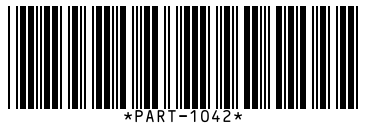
What Code 39 can and cannot hold
The name comes from its original 39 characters, later extended to 43:
- Capital letters A to Z
- Digits 0 to 9
- Space, hyphen, period, dollar sign, slash, plus sign and percent sign
There is no lowercase, no underscore and no comma. If you type lowercase letters here they are converted to capitals, and any character outside the set is named in the error so you know what to change. If you need lowercase or other symbols, use Code 128.
Code 39 is wide. Plan for it.
Each character uses nine elements, three of them wide, plus a gap. In practice a Code 39 barcode is about a third wider than Code 128 for the same text. Ten characters at a standard density need a little over 2 inches of width including quiet zones. On a small label, keep the content to eight characters or fewer, or move to a format that packs tighter.
The optional check character
Plain Code 39 has no check character, and that is what this generator produces, because it is what scanners expect by default. Some standards add a modulo 43 check character at the end. Only add one if your customer's specification says so, and make sure their scanners are configured to verify and strip it. Otherwise the extra character will appear at the end of every scan.
Printing and testing
Code 39 tolerates rough printing better than most formats, which is another reason it survives on factory floors. Keep a quiet zone of at least a quarter inch on each side and do not let the bars run to the label edge. To print a batch of part labels, paste the list into the bulk barcode generator and choose Code 39. To confirm a print reads correctly, take a photo and drop it into the online barcode scanner.